Skip to content

Find the job. Skip the admin.

Your Jobs brings fresh vacancies straight from employers’ own careers pages, fills their application forms with answers you’ve written once, and keeps the record of everything you send.

In development · iPhone & iPad See how it works
  • Free to search
  • No account
  • iPhone & iPad
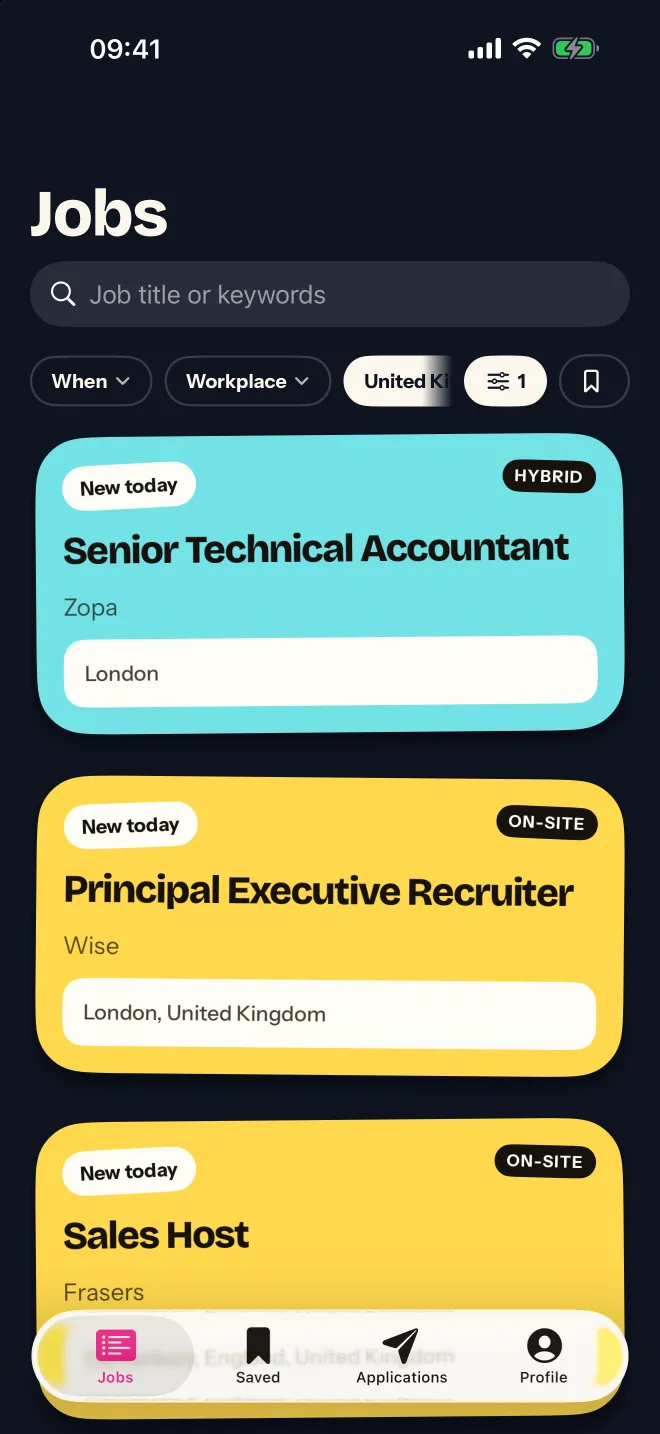
The Your Jobs feed: colourful cards for new roles, each marked New today, with filters for when, workplace and country.

free to search. always.

Straight from the source

No reposts. No stale listings.

Every role comes from the job board the employer runs themselves — the same page their own careers site links to — so it’s current, complete, and goes straight to the real application.

  • Monzo
  • NHS Jobs
  • Deliveroo
  • Wise
  • Trainline
  • Ocado
  • GoCardless
  • ASOS
  • Gymshark
  • Auto Trader
  • ElevenLabs
  • Synthesia
  • Wayve
  • Moonpig
  • Too Good To Go
  • Rockstar Games
  • Xero
  • Personio
  • GetYourGuide
  • Delivery Hero
  • Doctolib
  • N26
  • Qonto
  • Capcom
200+
employers’ job boards built in, across the UK, US, Europe and Japan.
Any company
Type a name and Your Jobs finds its board. You never see a URL.
Instant
The whole index lives on your phone, so search is immediate — even on the Tube.

Jobs

Fresh roles, every morning.

The feed opens newest first, with a sticker on everything that went up today. Your Jobs keeps checking the boards in the background, so what you see is what’s actually open.

  • WhenToday, this week or this month.
  • WhereRemote, hybrid or on-site — in the country you choose.
  • WhatSearch by job title or keyword, and save it for later.

Share sheet Found one on LinkedIn or Indeed? Share the link to Your Jobs and it’s saved with the rest.

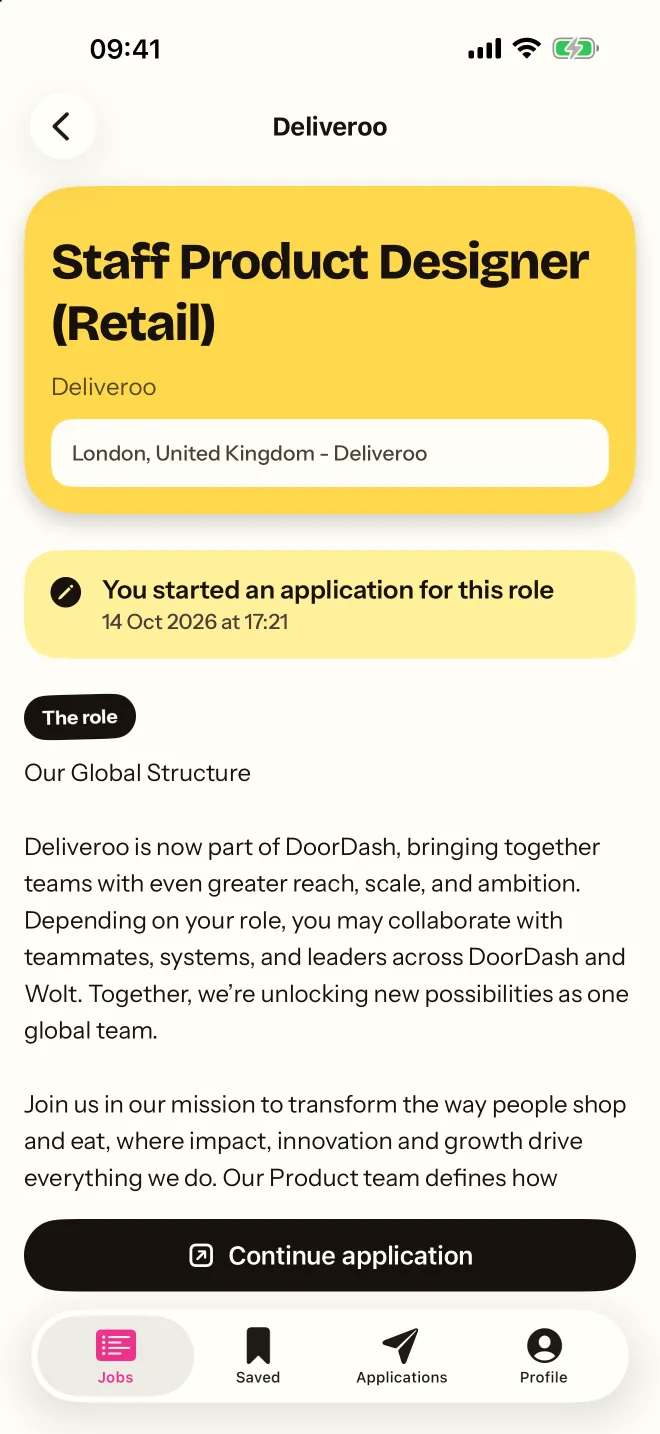
A job in Your Jobs: title, company, location, salary and the full description, with buttons to save it or apply.

Apply

Fill the form in one tap.

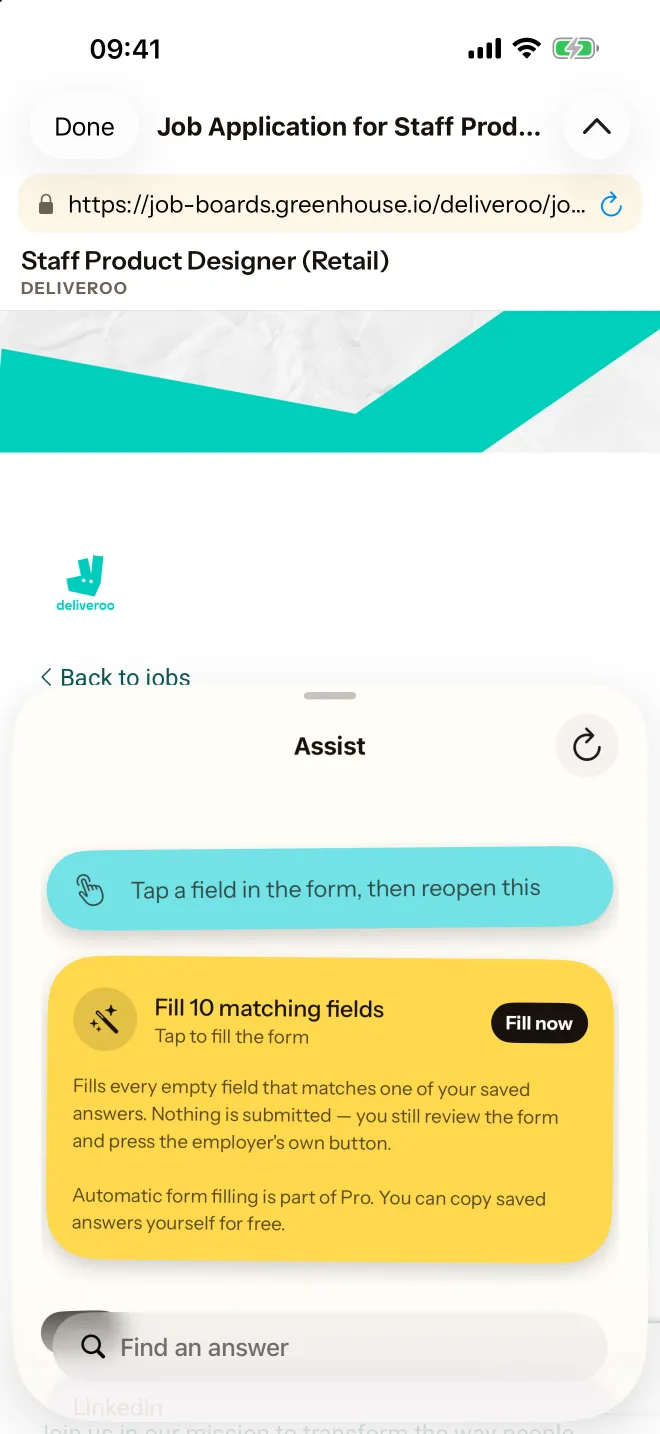
Applications open inside Your Jobs, exactly as the employer built them. Assist does the typing, so you’re editing rather than retyping.

  1. Open the application

    The employer’s own form, on their own site, without leaving the app.

  2. Tap Assist

    It finds every empty field it can match with an answer you’ve written, and fills them all at once.

  3. Read it, then press send

    Nothing is ever submitted for you. You check the form and press the employer’s own button.

Automatic filling is part of Pro. Copying your saved answers yourself is always free.

An employer’s application form open in Your Jobs, with the Assist panel offering to fill 10 matching fields.

Saved answers

Write it once. Use it everywhere.

Your name, your links, your notice period, that paragraph about why this company. Write each one once, keep it tidy, and it’s ready for every form you meet. Your CVs live alongside them.

Writing help, on your iPhone.

Shorten an answer to fit a character limit, adapt it to this role, or draft one from your CV. It runs on Apple Intelligence, on the device — nothing is uploaded.

  • Shorten to fit
  • Adapt to this role
  • Draft from my CV
  • First nameJamie12×
  • Emailjamie.okafor@icloud.com12×
  • Notice periodOne month9×
  • Right to workYes — UK citizen, no sponsorship needed9×
  • About youProduct designer with eight years across fintech and health…11×
  • Portfoliojamieokafor.design8×

Applications

Every application, in one place.

Start an application and Your Jobs starts the record. Close the form and you get one question — did you send it? — and that’s the whole of the admin.

  • Started
  • Applied
  • Interview
  • Offer

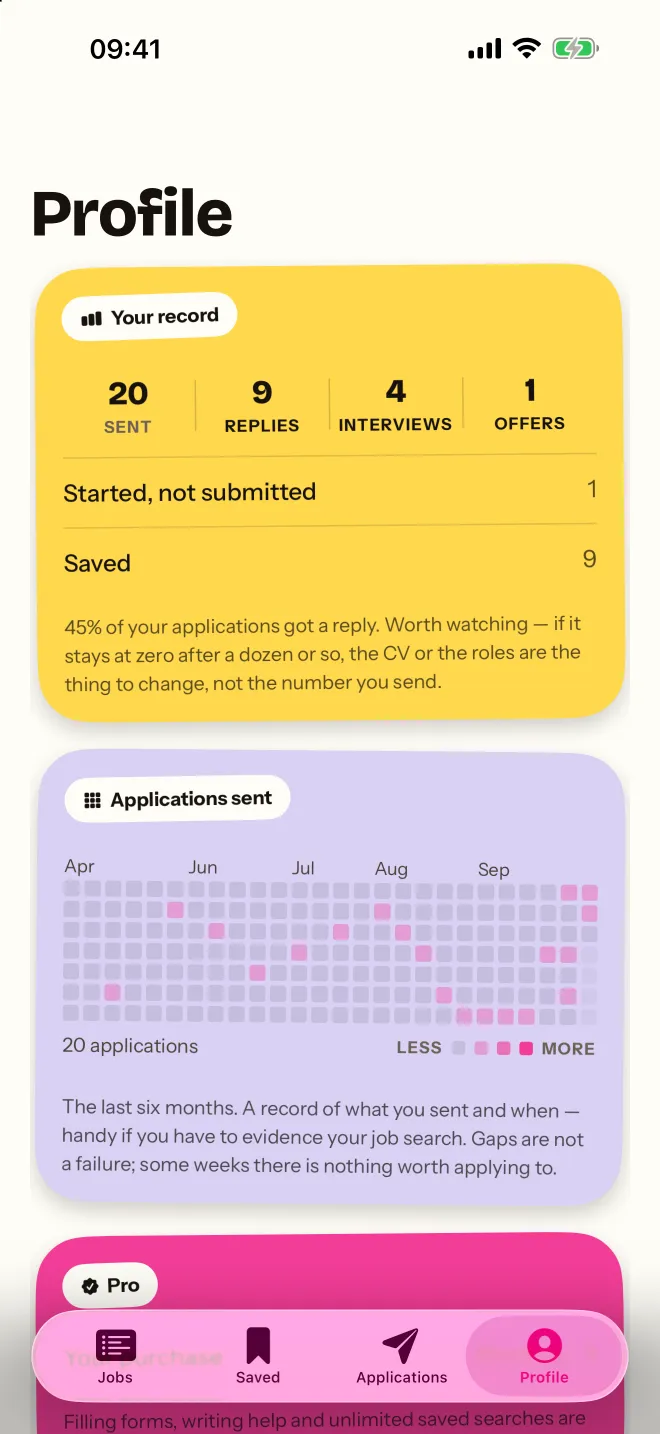
Every entry keeps its dates, the CV you sent and your notes. Your profile shows six months of activity at a glance — handy if you ever need to evidence your job search.

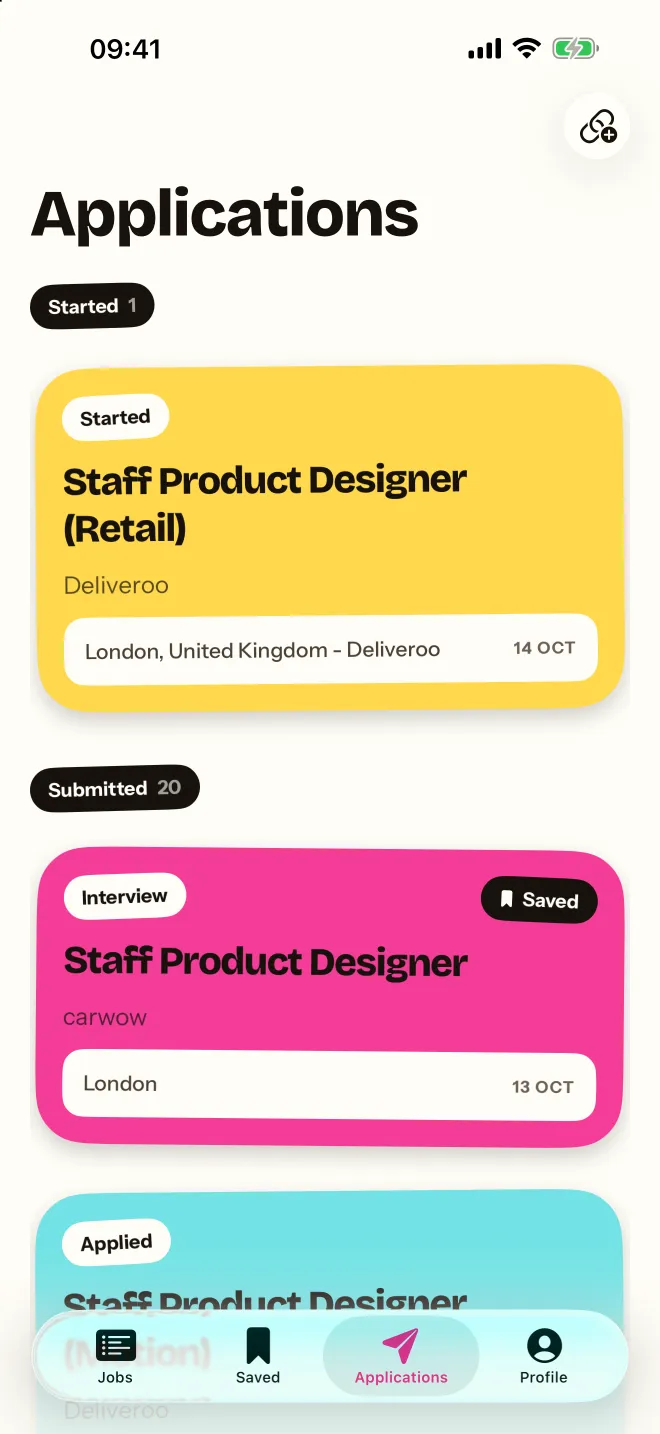
The Applications tab: one started application and twenty submitted, each a coloured card with its status and date.
The Profile tab: 20 sent, 9 replies, 4 interviews and 1 offer, above a six-month grid of applications sent.

Alerts

Be the first to know.

Save a search and Your Jobs keeps an eye on the boards while you get on with your day, then lets you know the moment something new matches.

Your first saved search comes with its alert, free. Pro watches as many as you’re running.

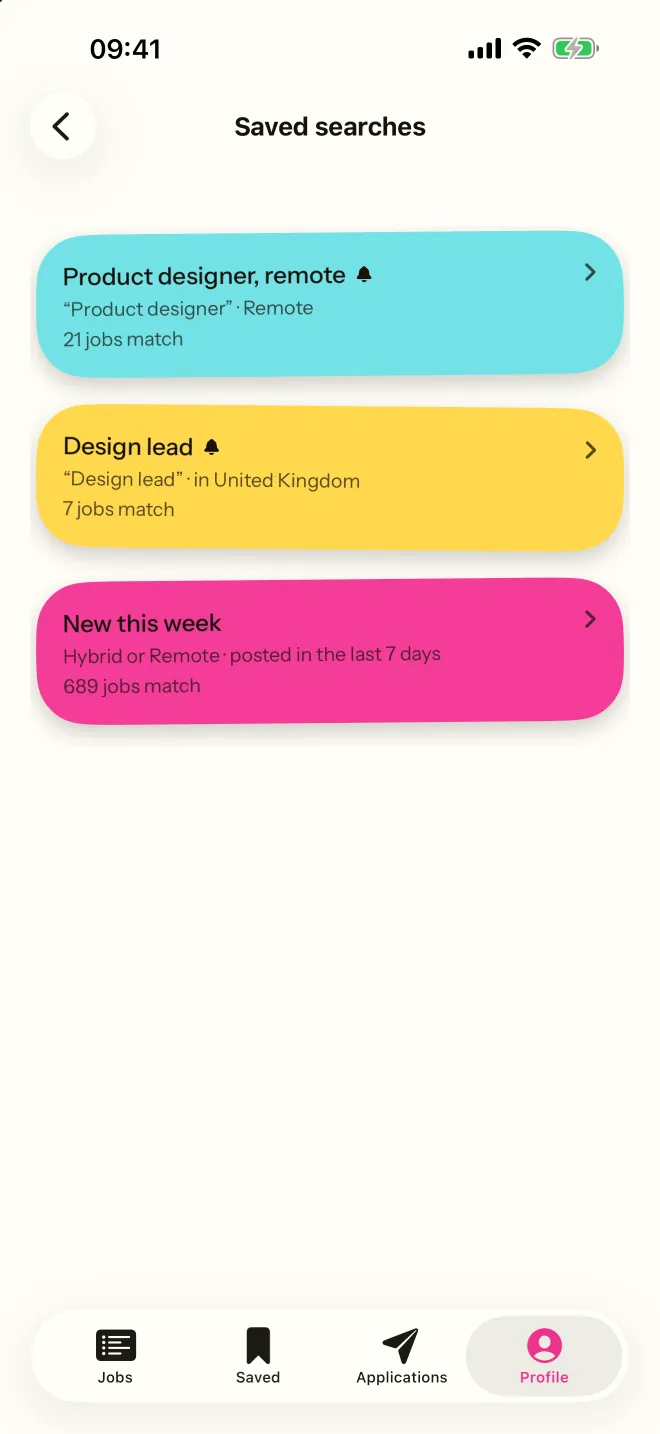
Saved searches: Product designer, remote; Design lead in the United Kingdom; and New this week, each showing how many jobs match.

After hours

Apply at 11pm.

Most job hunting happens after the working day. Your Jobs follows your phone into dark mode — a deep navy, easy on the eyes when the day is finally done.

  • iPhone and iPad
  • Syncs through your iCloud
  • English · Deutsch · Français · Español · 日本語
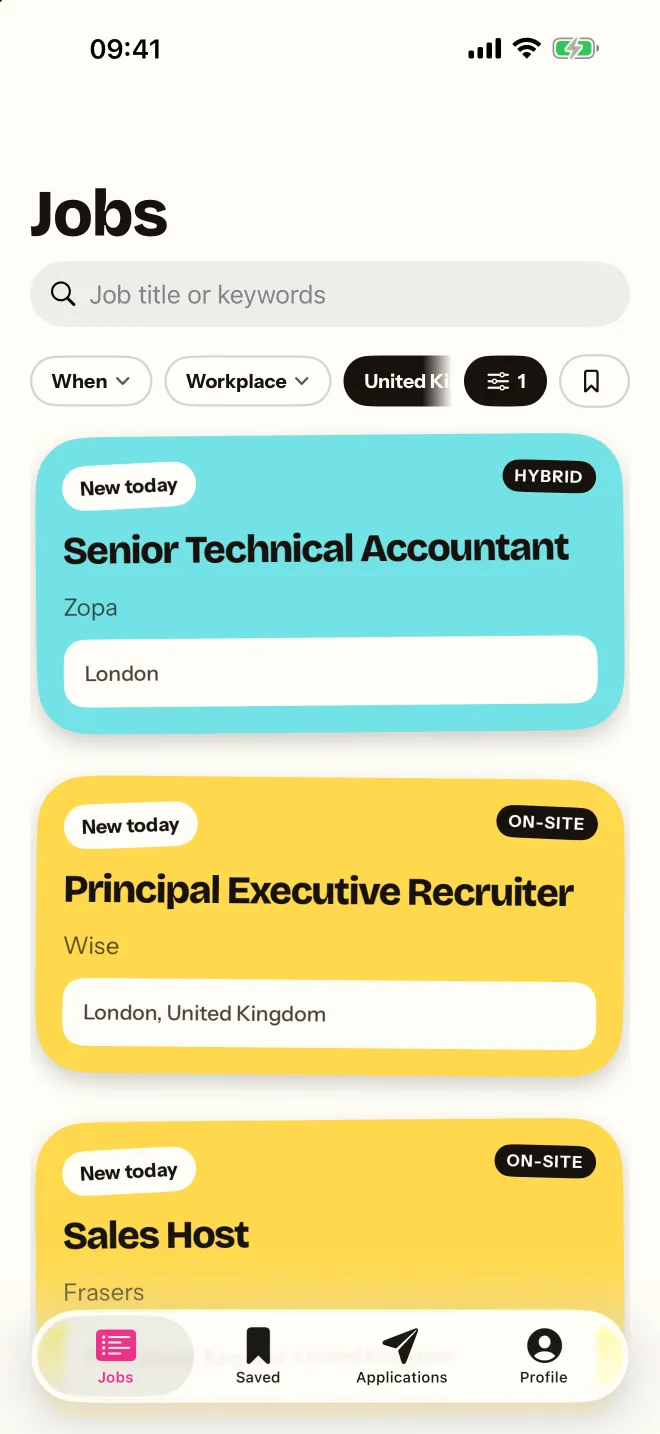
The jobs feed in light mode.
day
The same feed in dark mode, on a deep navy background.
night

Your search, your business

No account. No adverts. No server of ours.

  • Nothing to sign up to.

    Open the app and start looking. There is no Your Jobs account, no email to verify and no password to forget.

  • Your record stays yours.

    Answers, CVs and applications live on your device and sync through your own private iCloud. We can’t see them — we don’t have a copy.

  • No ads. No tracking.

    No advertising, no analytics SDKs, and nothing following you across apps. The people using this are often between jobs; they’re not the product.

Free and Pro

Finding the job is free. The app doing the work is Pro.

Free

Forever

No cap and no adverts.

  • Every job, every filter, every board
  • Saved jobs and your whole application history
  • Your saved answers and CVs — copy them into any form
  • One saved search, with its alert
  • Share jobs in from LinkedIn, Indeed or anywhere else

Pro

$4.99/mo or $29.99 once

Monthly, or pay once and keep it.

  • Fill the whole form in one tap
  • Insert any saved answer straight into a field
  • Writing help: shorten, adapt to the role, draft from your CV
  • As many saved searches as you like, every one with alerts

Prices shown in US dollars; they vary by country and Apple shows yours before you buy. The monthly plan renews automatically until you cancel in your Apple Account settings. Writing help needs a device with Apple Intelligence.

Questions

Good questions.

Anything else? The support page has more, and a real person answers email.

Is Your Jobs free?

Yes. Searching is free and always will be: every job, every filter and every board, plus your saved jobs, your whole application history, your written answers and your CVs, with no cap and no adverts. Pro adds the parts where the app does the work for you — filling forms, writing help and more than one saved search with alerts — for $4.99 a month or $29.99 once. Prices vary by country; Apple shows yours before you buy.

Where do the jobs come from?

Straight from the job boards employers publish themselves — the careers pages companies run on Greenhouse, Lever, Ashby, Workable, SmartRecruiters and others — plus NHS Jobs in the UK. Over two hundred employers are built in, and you can add any company by typing its name.

Does Your Jobs send applications for me?

No. Assist fills in the fields it can match with answers you’ve written, but nothing is ever submitted for you. You read the form and press the employer’s own button.

Do I need to create an account?

No. There is no Your Jobs account and no server of ours. Your answers, CVs and applications live on your device and sync between your iPhone and iPad through your own private iCloud.

Can I track jobs I found on LinkedIn or Indeed?

Yes. Share the link from LinkedIn, Indeed, Safari, Mail or Messages to Your Jobs, or paste it in the app, and it’s saved and tracked alongside everything else.

Which countries does Your Jobs cover?

Employers are built in across the United Kingdom, the United States, Germany, France, Spain and Japan, along with remote roles that hire across borders. The app is available in English, German, French, Spanish and Japanese.

What do I need to run it?

An iPhone or iPad on iOS or iPadOS 26.2 or later. Writing help uses Apple Intelligence, so it needs a device that supports it; everything else works on every supported device.
Your next job is already posted.

Coming soon to iPhone and iPad. Free to search.

In development · iPhone & iPad

good luck out there!